2026/04/26(日)PvPHubExtension:幻想人形演舞-ユメノカケラ-機能拡張MOD
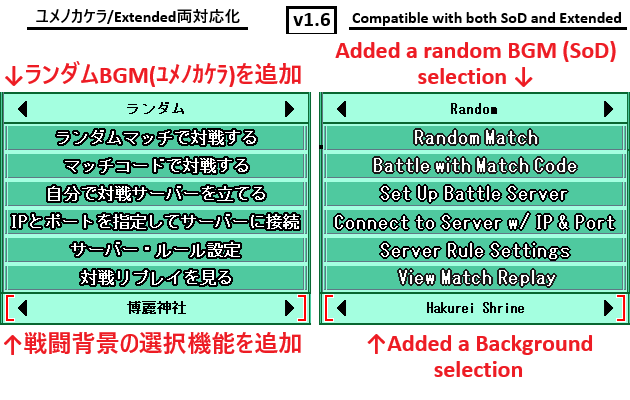
日本語と英語に対応しています。
There is an English document at the bottom of this page.
This is an extension MOD that adds features to the PvP menu in TPDP SoD (+Extended).
It supports both Japanese and English.
導入前に必ず、このページの解説やダウンロードファイル内の ReadMe_JP.txt をお読み下さい。
使用中、何か異常を感じた場合は、ご使用をおやめ下さい。
特に、対戦時に何か影響があると感じた場合は、必ずご使用をおやめ下さい。
Be sure to read the instructions on this page and the ReadMe_EN.txt file included in the download before installation.
If you notice anything unusual while using this product, please stop using it immediately.
In particular, if you feel that it is affecting your gameplay, please stop using it immediately.
- この拡張機能について
- 免責
- インストール
- アンインストール
- 動作確認環境
- 追加される機能と使い方
- 仕様の挙動
- 設定変更
- ダウンロード
- 更新履歴
- Credit(JP)
- About This Extension
- Disclaimer
- Installation
- Uninstallation
- Verified Environments
- Features and Usage
- Behavior Notes
- Configuration
- Download
- Change History
- Credit(En)
この拡張機能について
「幻想人形演舞-ユメノカケラ-」及び、その非公式拡張パッチである、「幻想人形演舞-ユメノカケラ- Extended 」「Battle Overlay」の対戦メニュー機能を拡張します。以下、この機能及び、配置されるファイル、修正されるファイル内容について「本拡張機能」と呼称します。
本拡張機能は、くしち個人の制作物であり、非公式のものです。
本拡張機能について、幻想人形演舞-ユメノカケラ-公式様への問い合わせはご迷惑になりますので行わないで下さい。
本拡張機能をご使用の際には、方針や仕様へのご理解、界隈へのご配慮等、自助自律に努めていただきますようお願いします。
免責
Windowsの基本的なファイル操作や、当該ゲームのインストールパスなどについては理解済の方の使用を想定しています。これらについては本ページでは解説しません。PCの性能によっては動作が遅くなる可能性があります。
動作させるPCの設定や仕様、あるいは本拡張機能の不具合などによって動かない可能性があります。
また、現在は動いていても、「幻想人形演舞-ユメノカケラ-」の仕様変更、「幻想人形演舞-ユメノカケラ- Extended」の仕様変更、OSの仕様変更、DirectXの仕様変更等によって将来動かなくなる可能性があります。
そうした様々な要因について、製作者は動作や対応を保証できません。
あらかじめご了承下さい。
導入前に幻想人形演舞-ユメノカケラ-のフォルダをフルバックアップして下さい。
本拡張機能は、ゲームの動作に強制的に介入するものです。
製作者の環境での動作検証は行っていますが、使用者全ての環境を想定することはできません。
想定外の不具合が発生することは充分ありえます。
ゲームクライアントやファイル、セーブデータ、リプレイデータなどの破壊が絶対に起こらないと保証することはできません。
ゲームの動作に強制的に介入するということのリスクについて、ご理解、ご了承の上、ご使用下さい。
本拡張機能の使用によって発生したいかなる損害にも製作者は一切の責任を負いません。
最悪のケースに備え、必ず導入前の環境を丸ごとバックアップし、元に戻せるように備えておくことを強くお勧めします。
インストール
PvPHubExtensionをインストールした環境に、ExtendedやBattleOverlayをインストールすると、PvPHubExtensionが上書きされ機能が失われます。ExtendedやBattleOverlayをインストールしたあとにPvPHubExtensionをインストールしてください。
本拡張機能はインストーラ形式で提供されます。
"PvPHubExtension-vX.X-setup.exe" を実行し、画面の指示に従って下さい。
主な選択項目:
- インストール時の表示言語 (jp / en)
- 動作環境の選択 (ユメノカケラ / Extended)
- 幻想人形演舞のフォルダ指定
- 操作 (新規インストール / アップデート / 再インストール / 削除)
- ゲーム内で使用する言語 ( jp / en)
- 有効にする機能の選択
- ランダムBGMの対象を選択 (機能選択で「自分で選ぶ」にチェックを入れた場合のみ)
インストーラは以下を自動的に行います。
- "dxgi.dll"が 対象の幻想人形演舞-ユメノカケラ- のフォルダに存在しない場合に配置。
- "PvPHubExtension.dll" を 幻想人形演舞-ユメノカケラ- (+Extended) のフォルダ内 plugins\ に配置。
- "TPDPHook.ini" に [pvp_hub] セクションを追記し、機能を有効化。
幻想人形演舞-ユメノカケラ-     # インストールフォルダ
├ gn_enbu.exe
├ ...
├ dxgi.dll                 # 無ければ自動で追加
├ TPDPHook.ini             # 情報追加
├ ...
├ dat
├ save
├ ...
└ plugins
  └ PvPHubExtension.dll  # DLL配置
アンインストール
"PvPHubExtension-vX.X-setup.exe" を再度実行し、操作選択ページで「PvPHubExtension を削除」を選択して下さい。
"PvPHubExtension.dll" の削除と "TPDPHook.ini" 内の [pvp_hub] セクションの削除が
自動的に行われます。
本インストーラが配置したdxgi.dllがあった場合、それも削除されます。
その後、
"PvPHubExtension-vX.X-setup.exe", "ReadMe_JP.txt", "ReadMe_EN.txt", "LICENSE"
を手動で削除してください。
動作確認環境
- 幻想人形演舞 -ユメノカケラ- ver1.103
- MOD: Extended ver3.41
- MOD: Extended ver4.0
- MOD: StyleIconExtension (for Extended)
- MOD: BattleOverlay (for SoD)
- MOD: BattleOverlay (for Extended)
追加される機能と使い方
ゲームを起動し対戦メニューを開くと、インストール時に有効にした機能が追加されます。対戦BGM拡張
BGM選択欄に、「ランダム」が追加されます。これを選ぶと、ゲーム中で1度聴いた曲の中からランダムに再生されます。
また、Extended版では、Extendedの追加曲を選択できるようになります。
こちらも、ゲーム中で1度聴いたことのある曲に限ります。
Extended版では「バトル!人形舞闘会」を選択すると別の楽曲が再生されていましたが、正しい楽曲が再生されるように修正されます。
対戦BGMのランダム選択
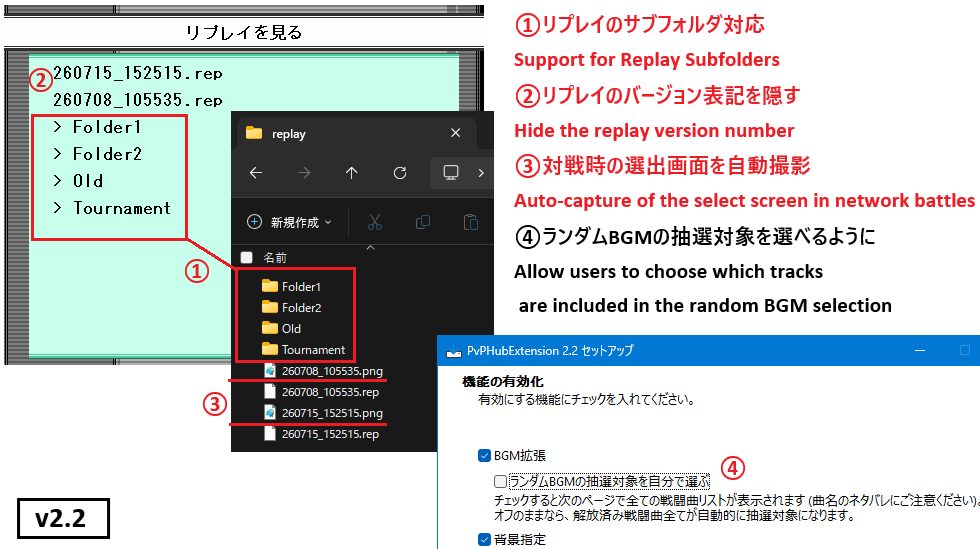
ランダムBGMの抽選対象を設定できます。インストール時にこの機能をオフにした場合、ユメノカケラの解放済み戦闘曲すべてが抽選対象になります。
曲名のネタバレ防止のため、新規インストール時はオフになっています。
戦闘背景の指定
画面下部に新たに背景画像を指定する項目が追加されます。対戦時の背景を、ここで指定したものに固定することができます。
対象は、元々ランダムに出現していた背景に限られます。
「ランダム」を選択すると対象の中からランダムで出現します。これはオリジナルと同じ挙動です。
リプレイのサブフォルダ表示
リプレイ選択画面で、save\replay 直下のサブフォルダを開いて中のリプレイを再生できるようになります。リプレイ一覧のバージョン表記を隠す
リプレイ一覧の各行頭にある "verX.XX " の表記を隠します。ファイル名が長い場合に見やすくなります。対戦時の選出画面を自動撮影
ゲーム内の設定で「リプレイを保存する」を選択している場合、ネット対戦時の人形選出画面を自動で撮影します。撮影された画面は、リプレイファイル(.rep)と同じ名前の .png としてreplayフォルダに保存します。
仕様の挙動
対戦BGM拡張を行うと、楽曲「バトル!人形舞闘会」は「バトル!八雲紫」と解禁状態が共有されるようになります。ゲーム中で「バトル!人形舞闘会」を聴いても、「バトル!八雲紫」を聴いていないと、「バトル!人形舞闘会」は選択できなくなります。
設定変更
本拡張機能の設定は "TPDPHook.ini" 内の [pvp_hub] セクションで行います。インストーラが書き込むため、通常は手動編集の必要はありません。
設定項目
[pvp_hub]
language          = jp       ; ゲーム内で表示ラベルの言語
bgm_extension     = true     ; BGM選択機能の拡張
bgm_random_pool   = 1,2,3…  ; ランダムBGMの抽選対象を番号で指定
background_select = true     ; 先頭背景指定
replay_subfolder  = true     ; リプレイのサブフォルダ表示
replay_hide_ver   = true     ; リプレイバージョン表記を隠す
replay_screenshot = true     ; 選出画面の自動撮影
言語を切り替えたい場合は language の値を jp または en に変更して下さい。
機能を一時的に無効化したい場合は各機能の値を true から false に書き換えて下さい。
bgm_random_pool の番号は、BGM選択欄に表示される曲の並び順(先頭を1とする番号)です。
変更後はゲームの再起動が必要です。
ダウンロード
- PvPHubExtension Ver.2.2
PvPHubExtension Ver.1.93※公開終了PvPHubExtension Ver.1.6※公開終了PvPHubExtension Ver.1.1※公開終了
更新履歴
【ver2.2:2026.7.19】- 対戦BGMのランダム選択で、任意のBGMを抽選対象にする機能を追加
- リプレイ選択画面でサブフォルダ内のリプレイを再生できる機能を追加
- リプレイ一覧のバージョン表記を隠す機能を追加
- 対戦時の選出画面を自動撮影する機能を追加
- コードマッチ/IPマッチ時に背景指定欄が一瞬表示される問題を修正
【ver1.93:2026.5.9】
- 背景選択欄が表示遅延を起こしていた問題を解消
【ver1.6:2026.5.5】
- ユメノカケラに対応
- BGMのランダム選択機能を追加
- 対戦背景を指定する機能を追加
【ver1.1:2026.4.26】
- Extended専用として公開
- Extendedの追加曲を選択可能にする機能を追加
Credit(JP)
幻想人形演舞、幻想人形演舞-ユメノカケラ-は、同人サークルFocasLens様/幻想人形劇団様 の著作物で、東方Projectの二次創作作品です。幻想人形演舞-ユメノカケラ-Extended (Touhou Puppet Dance Performance Sard of Dream Extended)は、Barudo様のチームが制作された、幻想人形演舞-ユメノカケラ-の非公式拡張パッチです。
Mod:Shard of Dreams - Battle Overlayは、Wowoer様の公開された、幻想人形演舞-ユメノカケラ-/Extendedの非公式機能拡張パッチです。
本ツールはくしち個人による、非公式の制作物です。
本ツールに関する、FocasLens様/幻想人形劇団様/Barudo様チーム/Wower様へのお問い合わせはご迷惑となりますので行わないようお願い申し上げます。
About This Extension
This is an unofficial extension MOD that adds features to the PvP menu of 幻想人形演舞-ユメノカケラ-(Gensou Ningyou Enbu: Yumeno Kakera)/"Touhou Puppet Dance Performance: Shard of Dreams" (TPDP SoD)and its unofficial extension patch "TPDP SoD Extended" and Battle Overlay.
This functionality, the DLL file, and the changes it makes to other files are
referred to below as "this extension".
This extension is a personal, unofficial work.
Please do not contact the official TPDP SoD developers about issues related to this extension; doing so only causes them inconvenience.
Please use this extension responsibly, with awareness of its design and consideration for the wider community.
Disclaimer
This guide assumes that you are already familiar with basic Windows file operations and the installation path for the game in question. These topics will not be covered on this page.Performance may degrade depending on PC specifications.
The extension may fail to operate due to PC configuration, specifications, or bugs within the extension itself.
Even if it works today, future changes to "TPDP SoD", "TPDP SoD Extended", the operating system, or DirectX may break compatibility in the future.
The author cannot guarantee operation or provide support for these factors.
Please understand and acknowledge this before use.
BACK UP YOUR ENTIRE TPDP FOLDER BEFORE INSTALLING THIS EXTENSION
This extension forcibly intervenes in the game's runtime behavior.
The author has tested it in their own environment, but cannot anticipate every user environment.
Unexpected issues are entirely possible.
Damage to game executables, files, save data, or replay data cannot be absolutely guaranteed never to occur.
Please use this extension only after fully understanding and accepting the risks of forced runtime intervention.
The author bears no responsibility for any damage caused by use of this DLL.
To prepare for the worst case, we strongly recommend backing up the entire pre-installation environment so that you can revert if necessary.
Installation
If you install Extended or BattleOverlay on a system where PvPHubExtension is already installed, PvPHubExtension will be overwritten and its functionality will be lost.Please install PvPHubExtension after installing Extended or BattleOverlay.
This extension is distributed in installer form.
Run "PvPHubExtension-vX.X-setup.exe" and follow the on-screen instructions.
Main choices:
- Installer display language (jp / en)
- Game environment (SoD / Extended)
- The TPDP installation folder
- Operation (Fresh install / Update / Reinstall / Remove)
- In-game language (jp / en)
- Features to enable
- Random BGM pool (only if you tick "Choose the random BGM pool myself")
The installer automatically performs the following:
- Place “dxgi.dll” in the folder for TPDP SoD if it is not already present.
- Places "PvPHubExtension.dll" into the plugins\ subfolder of TPDP SoD (+Extended)
- Adds a [pvp_hub] section to "TPDPHook.ini" to enable the extension
To upgrade or remove the extension, run the same installer (".exe") again and select the desired action on the operation page.
If a previous version of "PvPHubExtension.dll" is detected, the installer automatically determines whether to offer "Update" or "Reinstall".
幻想人形演舞-ユメノカケラ- # TPDP SoD/Extended folder
├ gn_enbu.exe
├ ...
├ dxgi.dll          # If don't exists, it will be added
├ TPDPHook.ini      # Additional Settings
├ ...
├ dat
├ save
├ ...
└ plugins
  └ PvPHubExtension.dll  # Place the DLL
Uninstallation
Run "PvPHubExtension-vX.X-setup.exe" again and select "Remove PvPHubExtension" on the operation page."PvPHubExtension.dll" and the [pvp_hub] section in "TPDPHook.ini" are deleted automatically.
After that, manually delete the following:
"PvPHubExtension-vX.X-setup.exe", "ReadMe_JP.txt", "ReadMe_EN.txt", "LICENSE"
Verified Environments
- TPDP SoD ver1.103
- MOD: TPDP SoD Extended ver3.41
- MOD: TPDP SoD Extended ver4.0
- MOD: StyleIconExtension (for Extended)
- MOD: BattleOverlay (for SoD)
- MOD: BattleOverlay (for Extended)
Features and Usage
After launching the game and opening the PvP menu, the features you enabled during installation will be added.PvP BGM Extension
The “Random” option will be added to the BGM selection menu.Selecting it plays a random track from the ones you have heard at least once in-game.
In Extended, you will also be able to select the tracks added by Extended.
These are likewise limited to tracks you have heard at least once in-game.
In Extended, selecting "Vs Butokai Puppeteer" played a different track; with this extension, the correct track is played.
Random Selection of PvP BGM
You can configure which tracks are eligible for the random BGM.If you turn this feature off during installation, all unlocked SoD battle themes become eligible.
It is off on a fresh install, to avoid spoiling track titles.
Specifying the Battle Background
A new option to select a background image has been added at the bottom of the screen.You can set the background for battles to the image selected here.
This option is limited to backgrounds that previously appeared randomly.
If you select “Random,” the background will appear randomly from the available options.
This behaves the same as the original version.
Replay Subfolder Access
On the replay selection screen, you can open subfolders directly under save\replay and play the replays inside them.Hide Version Prefix in Replay List
Hides the "verX.XX " prefix at the head of each row in the replay list. This improves readability when filenames are long.Auto-capture the Select Screen
If you have selected "save replays" in the in-game settings, the puppet-selection screen in online battles is captured automatically.The captured screen is saved to the replay folder as a .png with the same name as the replay file (.rep).
Behavior Notes
With the PvP BGM Extension active, the unlock state of "Vs Butokai Puppeteer" becomes shared with that of "Vs Yukari Yakumo".Even if you hear "Vs Butokai Puppeteer" played during gameplay, it cannot be selected from the menu unless you have also heard "Vs Yukari Yakumo".
Configuration
This extension's settings live in the [pvp_hub] section of "TPDPHook.ini".Since the installer handles this, manual editing is usually not necessary.
Settings
[pvp_hub]
language          = jp       ; In-game label language
bgm_extension     = true     ; Extend the BGM selection
bgm_random_pool   = 1,2,3…  ; Random BGM pool, specified by number
background_select = true     ; Battle background selection
replay_subfolder  = true     ; Replay subfolder access
replay_hide_ver   = true     ; Hide the replay version prefix
replay_screenshot = true     ; Auto-capture the select screen in network battles
To switch the language, change "language" to "jp" or "en".
To temporarily disable a feature, change its value from true to false.
A game restart is required for changes to take effect.
Download
- PvPHubExtension Ver.2.2
PvPHubExtension Ver.1.93No longer availablePvPHubExtension Ver.1.6: No longer availablePvPHubExtension Ver.1.1: No longer available
Change History
[ver2.2: 2026.7.19]- Added the ability to choose which tracks are eligible for the random BGM selection
- Added the ability to play replays inside subfolders on the replay selection screen
- Added an option to hide the version prefix in the replay list
- Added auto-capture of the select screen
- Fixed an issue where the background-select field briefly appeared when starting a battle via match code or IP
[ver1.93: 2026.05.09]
- Fixed a delay in displaying the background selection field
[ver1.6: 2026.05.05]
- Compatible with SoD
- Added a random BGM selection
- Added a Background selection
[ver1.1: 2026.04.26]
- Released exclusively for Extended
- Added a feature to allow selection of songs added in the Extended version
Credit(En)
"幻想人形演舞-ユメノカケラ-(Gensou Ningyou Enbu: Yumeno Kakera)/Touhou Puppet Dance Performance: Shard of Dreams (TPDP SoD)" are the works of the doujin circle FocasLens / 幻想人形劇団(Gensou Ningyou Gekidan), and are derivative works of Touhou Project."Touhou Puppet Dance Performance: Shard of Dreams" is the unofficial English title.
"Touhou Puppet Dance Performance: Shard of Dream Exntended" is an unofficial expansion patch created by Barudo (+his team).
"Mod:Shard of Dreams - Battle Overlay" is an unofficial expansion patch released by Wower.
This extension is an unofficial creation by くしち (Kushichi) (individual).
Please do NOT contact FocasLens, Gensou Ningyou Gekidan, Barudo's team, Wower about this extension — it would only cause them trouble.